

Thesis format guide for master’s students

A clear thesis format defines the required sequence of preliminary pages, main chapters, and back matter alongside the typographic rules for a complete master's manuscript. Graduate schools enforce these standards so every submitted thesis meets institutional archiving, microfilming, and binding requirements without manual reformatting by library staff. Before adjusting margins or spacing in your word processor, download your university's official formatting manual and template from the graduate school website or library portal. Because many manuals combine master's and doctoral rules, reviewing the difference between a thesis and a dissertation helps confirm which pages apply to your degree.
Working from an authoritative layout reference prevents rejected electronic submissions during the final weeks of your degree. The sections below walk through a university page-order model, a sample title page, core page-setup rules, pagination steps, and a pre-submission PDF checklist.
Thesis format example
Reviewing a standard thesis paper format helps you see how front matter, body chapters, and reference sections fit together before you configure your document. The table below follows the official master's thesis sequence published by the University of Missouri Graduate School, showing what each section contains, which pages are optional, and what details to verify during layout checks.
| Part of the thesis | What it contains | What to check |
|---|---|---|
| Title page | Full thesis title, degree statement, institutional affiliation, student name, supervisor name, and graduation month and year | Required page, centered horizontally, counted as page i with the numeral hidden |
| Copyright page | Copyright notice identifying the author | Optional page, not counted, numbered, or listed in the table of contents |
| Approval page | Thesis approval statement and committee member names | Required page, without committee signatures or a page number |
| Dedication | Brief personal tribute honoring family members, mentors, or supporters | Optional page, not counted, numbered, or listed in the table of contents |
| Acknowledgments | Recognition of thesis advisors, committee members, funding agencies, and research participants | Required section, beginning with lowercase Roman numeral ii |
| Table of contents | List of acknowledgments and subsequent sections with page numbers | Required page, excludes preceding preliminary pages and matches exact heading titles |
| List of illustrations or figures | Sequential list of figure numbers, captions, and starting page numbers | Required when applicable, with entries matching the corresponding figure titles and page numbers |
| List of tables | Sequential list of table numbers, titles, and starting page numbers | Required when the thesis contains one or more numbered data tables |
| List of abbreviations or symbols | Definitions of specialized acronyms, technical symbols, or nomenclature used in the text | Optional page unless required by the academic discipline or committee |
| Academic abstract | Concise summary of the research problem, methodology, findings, and conclusions | Required page, placed after the table of contents and lists of figures or tables |
| Body of the thesis | Main chapters including introduction, literature review, methods, results, and discussion | Required section, begins on Arabic numeral page 1 with consistent chapter headings |
| Bibliography or references | Complete list of works cited or consulted across the manuscript | Required section, formatted consistently according to the department's chosen citation manual |
| Appendices | Supplementary instruments, raw datasets, questionnaires, code, or ethics approval letters | Optional section, labeled alphabetically such as Appendix A and Appendix B |
| Vita | Brief academic biography summarizing the author's degrees and scholarly background | Optional for master's theses at the University of Missouri |
At the University of Missouri, the table of contents includes the acknowledgments and the sections that follow it, while excluding the title, copyright, approval, and dedication pages. While the University of Missouri places the academic abstract after the table of contents and lists of illustrations or tables, some universities place the abstract earlier in the front matter, so always verify your graduate school's exact page sequence.
Sample thesis title page
A master's title page follows rigid institutional wording rather than creative graphic design. Using the University of Missouri Graduate School's official title-page model as a worked example, the sample below illustrates how required text blocks align on a standard page with fictional student and project details.
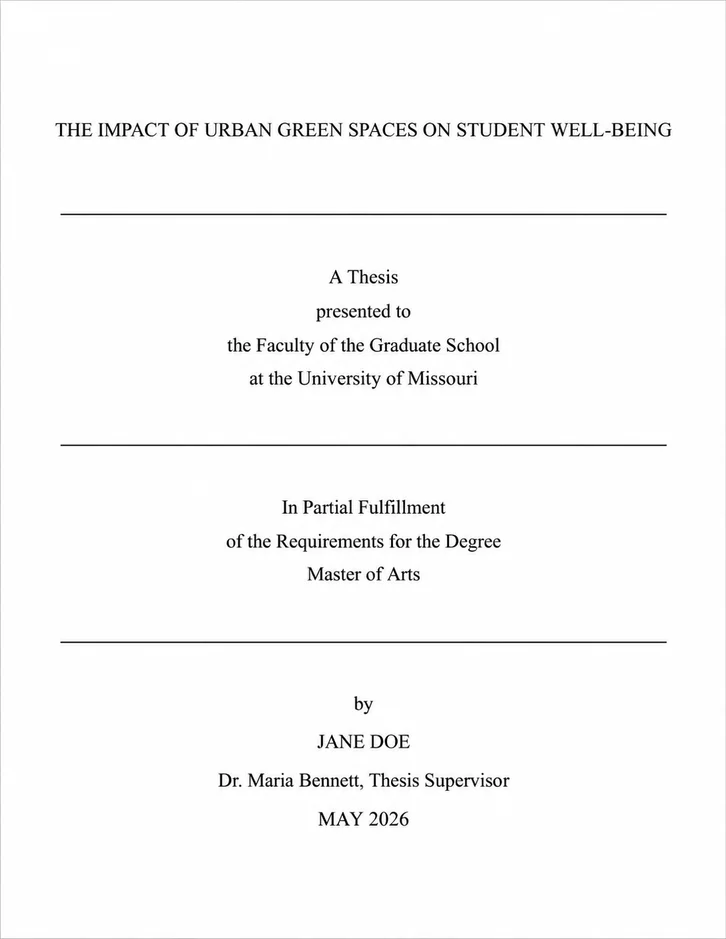
Every line on this sample title page is centered horizontally between the left and right margins, and vertical spacing distributes the four text blocks evenly between the top and bottom margins. The thesis title, student name, and graduation month and year appear in uppercase letters without a comma separating the month from the year. Although the title page counts as preliminary page i, the page number remains hidden on the sheet.
How to format a thesis
Applying a consistent thesis format becomes much easier when you start with your graduate program's official Word or LaTeX template rather than building a blank document from scratch. Official templates already contain preconfigured page dimensions, margin boundaries, paragraph styles, and section breaks that match university repository rules.
If your program does not supply a downloadable file, set up your core document styles before pasting chapters together. Separating content revision from layout configuration prevents broken section breaks, shifting tables, and mismatched fonts when advisors request late structural edits.
Set the margins, font, and line spacing
Uniform page geometry ensures that text, tables, and visual figures stay legible both on screen and in bound print copies. Follow your graduate school's requirements for page dimensions and margins throughout the manuscript.
Before adjusting individual chapters, configure the baseline document settings outlined below to keep typography and spacing uniform across your entire thesis.
- Confirm the required page size in your graduate school’s formatting manual before setting up the document.
- Follow Oregon State University’s margin requirements of at least 1 inch, with a preferred top margin of 1.2 inches and a 1.5-inch left margin for copies intended for binding.
- Use a consistent, readable typeface in 10- to 12-point size for body text, following Oregon State University’s font requirements.
- Follow your university’s line-spacing requirements. Oregon State University allows consistent 1.5 or double spacing for the main text, with single spacing for specified elements such as block quotations, figure titles, and table captions.
- Follow your university’s required spacing for reference entries. For example, Oregon State University specifies single-spaced citations with consistent spacing between entries.
Using the same font family for headings, body text, captions, and page numbers prevents visual clutter and avoids font-embedding errors during PDF conversion. Keep figure and table captions consistent with your university’s font-size requirements, and make sure text within figures and tables remains readable. Check that wide equations, charts, and scanned approval forms also stay inside the 1-inch margin boundaries on every page.
Format page numbers and headings
Pagination requirements vary by university. The CUNY Graduate Center uses lowercase Roman numerals for preliminary pages, counting the title page without displaying its number. Oregon State University, by contrast, requires preliminary pages to remain unnumbered. Check your graduate school’s instructions before configuring page numbers in your document.
Arabic numerals begin at 1 on the first page of Chapter 1 and continue sequentially through the bibliography and appendices. Organizing your manuscript around a structured thesis outline before applying built-in heading styles makes it simple to keep chapter levels consistent and generate an accurate table of contents. Keeping heading capitalization, spacing above subheadings, and Widow/Orphan pagination controls uniform also prevents isolated headings from appearing alone at the bottom of a page.
If your university requires Roman numerals for preliminary pages and Arabic numerals for the main text, follow these five steps in Microsoft Word to configure pagination and generate an automatic table of contents.
- Place a Next Page section break at the end of the final preliminary page so front matter and main chapters have independent headers and footers.
- Open the footer on the first page of Chapter 1, turn off the Link to Previous option, select Arabic numerals, and set the starting number to 1.
- Return to the preliminary section footer, select lowercase Roman numerals, set the starting number to 1, and check Different First Page on the title page so numeral i stays hidden.
- Assign built-in Heading 1 styles to all preliminary list titles, chapter titles, references, and appendix titles, using Heading 2 and Heading 3 for nested subsections.
- Insert an automatic table of contents and verify that every listed heading matches the exact wording and capitalization in the body text.
If your university excludes certain preliminary pages from the pagination sequence, use additional section breaks and adjust the numbering accordingly.
Thesis formatting checklist before submission
Converting your finished manuscript into a PDF locks line breaks, margins, and embedded fonts in place for final graduate school review. As emphasized in the CUNY Graduate Center's pre-submission guidelines, inspecting the exported PDF page by page catches layout shifts that are easy to miss inside an editable document.
Use the checklist below during your final review to verify that every structural and visual thesis format requirement is satisfied before uploading your manuscript.
- Verify that every preliminary page, main chapter, reference section, and appendix appears in your graduate school's exact required order with no accidental blank pages.
- Check top, bottom, left, and right margins across text, table, and figure pages to confirm that every element stays within your university’s required margins.
- Confirm that preliminary pages and main chapters follow your graduate school’s pagination requirements, including which pages are counted and which display page numbers.
- Inspect all chapter titles and subheadings to verify consistent font size, bolding, spacing, and hierarchy across every section.
- Compare every entry in the table of contents, list of tables, and list of figures against the exact titles and page numbers in the exported PDF.
- Review all figure and table captions for consecutive numbering, consistent placement above or below visuals, and crisp image resolution.
- Confirm that all required appendices appear in the correct location according to your graduate school’s page-order requirements and use consistent heading styles.
Running through these seven checks at least a few days before your submission deadline gives you ample time to fix pagination or margin errors without last-minute stress. When tight research schedules or committee revisions leave little time to balance drafting with technical layout rules, students can also buy thesis paper online through EssayMarket for custom academic writing and editing assistance.
Sources
- Formatting Your Thesis or Dissertation. (n.d.). University of Missouri Graduate School. https://gradschool.missouri.edu/academics/thesis-dissertation/formatting-guidelines/
- Formatting a Thesis or Dissertation. (n.d.). Oregon State University, Office of Graduate Education. https://graduate.oregonstate.edu/current-students/thesis-guide/formatting-thesis-or-dissertation
- Format Requirements. (2026). CUNY Graduate Center, Mina Rees Library. https://libguides.gc.cuny.edu/dissertations/format
FAQ
1. Can I use APA or MLA format for my thesis?
2. How do I format a table that is too wide for a thesis page?
3. Why don’t the page numbers in my thesis table of contents match the PDF?
Related articles



Comments (0)
Thank you for your comment! 🌟
It has been submitted and is awaiting moderation. Stay tuned—it will be visible soon!